Saturday, August 18, 2012

SQL Stored Procedure Parameters

SQL Server Stored-Procedures can return data in 4 forms:
1. Return Code: which are always an integer value.
2. OUTPUT Parameter: which can return either data (such as an integer or character value) or a cursor variable (cursors are result sets that can be retrieved one row at a time).
3. A result set for each SELECT statement contained in the stored procedure or any other stored procedures called by the stored procedure.
4. A global cursor that can be referenced outside the stored procedure.

In SQL Server, there are two ways with we can pass parameters to procedures.
  • INPut parameter
  • OUTPut parameter
INPut parameter
These types of parameters are used to send values to stored procedures.
OUTPut parameter
These types of parameters are used to get values from stored procedures. This is similar to a return type in functions.
In this post we will try to understand how stored procedure returns the parameter
Example
?
1
2
3
4
5
6
7
8
9
10
11
12
13
14
15
16
17
18
19
20
-- Create a table
CREATE TABLE myTable
(
    ID INT Identity(1,1),
    Name VARCHAR(20)
)
-- Now Create a Stored Procedure with the OUTPUT  parameter
CREATE PROCEDURE my_sp
(
    @name VARCHAR(20),
    @id_out INT OUTPUT
)
AS
BEGIN
INSERT INTO myTable VALUES (@name)
SELECT  @id_out = Scope_Identity ()
END
GO

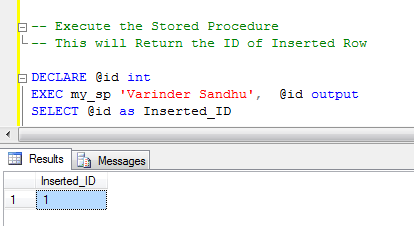
01_Stored Procedure with Output Parameters
Stored Procedure with Output Parameters
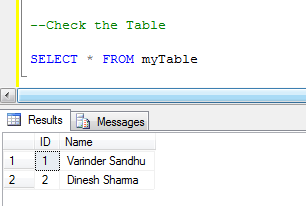
Similarly, for the second row
02_Stored Procedure with Output Parameters
Stored Procedure with Output Parameters

03_Stored Procedure with Output Parameters
Stored Procedure with Output Parameters
Similarly you can get values from stored procedures as you need or required. Hope this post helps you to understand the OUTPut parameters.


Input parameters are those parameters that you pass to the stored procedure
which the SP uses to retrieve records or do some manipulation. 
Output parameters are those parameters that you want the stored procedure
to return to the application that is calling it.
Basically you use output parameters if you want to
return a single value to the calling application.
If you intend to return multiple values or multiple rows,
you can use a record set instead (by calling a SELECT statement).

Common Table Expression

What is a Common Table Expression (CTE)

A CTE can be thought of as a temporary result set and are similar to a derived table in that it is not stored as an object and lasts only for the duration of the query. A CTE is generally considered to be more readable than a derived table and does not require the extra effort of declaring a Temp Table while providing the same benefits to the user. However; a CTE is more powerful than a derived table as it can also be self-referencing, or even referenced multiple times in the same query.
The basic syntax structure for a CTE is shown below:
WITH MyCTE
AS ( SELECT EmpID, FirstName, LastName, ManagerID
FROM Employee
WHERE ManagerID IS NULL )
SELECT *
FROM MyCTE

Building a Recursive CTE

In the following examples, you will learn how to harness the power of a recursive CTE query by fulfilling a common business requirement, retrieving hierarchical data. By the time the final query is complete you will be able to easily determine how many levels from the top executive each employee is.
A recursive CTE requires four elements in order to work properly.
  1. Anchor query (runs once and the results ‘seed’ the Recursive query)
  2. Recursive query (runs multiple times and is the criteria for the remaining results)
  3. UNION ALL statement to bind the Anchor and Recursive queries together.
  4. INNER JOIN statement to bind the Recursive query to the results of the CTE.
WITH MyCTE
AS ( SELECT EmpID, FirstName, LastName, ManagerID
FROM Employee
WHERE ManagerID IS NULL
UNION ALL
SELECT EmpID, FirstName, LastName, ManagerID
FROM Employee
INNER JOIN MyCTE ON Employee.ManagerID = MyCTE.EmpID
WHERE Employee.ManagerID IS NOT NULL )
SELECT *
FROM MyCTE

Identify the Anchor and Recursive Query

Anyone who does not have a boss is considered to be at the top level of the company and everyone who does have a boss either works for the person(s) at the top level (upper management), or the people that work for them (mid-management thru base employees).
For example, a CEO is at the top level and thus has a ManagerID of null. Likewise, everyone below the CEO will have a ManagerID. This is demonstrated in the two queries below:
CTE Screenshot 1
The first SELECT statement will become your Anchor query as it will find the employee that has a ManagerID of null (representing Level 1 of the organization). The second SELECT statement will become your Recursive query and it will find all employees that do have a ManagerID (representing Level 2-3 of this organization).
As you can see from the results so far, these queries are unable to give hierarchical data on which level each employee is at within the organization.

Add the Anchor and Recursive query to a CTE

Begin transforming this entire query into a CTE by placing a UNION ALL statement between the Anchor and Recursive queries. Now add parentheses around the entire query, indenting it, moving it down, and adding the declaration WITH EmployeeList AS before the open parenthesis, and then add SELECT * FROM EmployeeList on the next line after the close parenthesis.
Your query should now look like the screenshot below:
CTE Screenshot 2
As you can see, the results from your CTE are exactly the same as the results returned from running the anchor and Recursive queries simultaneously in the previous example.

Add an expression to track hierarchical level

The Anchor query (aliased as ‘Boss’) inside the CTE represents everyone at Level 1 (i.e. Sally Smith). The Recursive query (aliased as ‘Emp’) represents everyone at Levels 2 and 3. In order to visualize each level in a result set, you will need to add an expression field to each query.
Add the expression “1 AS EmpLevel” to the Anchor query and the expression “2 AS EmpLevel” to the Recursive query. Before executing the entire query, look closely at the expression field. The EmpLevel expressions in the Anchor query will hard-code the numeral 1 (for Sally Smith’s level), while the EmpLevel expressions in the Recursive query will hard-code the numeral 2 for everyone else.
Your query should now look like the screenshot below:
CTE Screenshot 3
The two new expression fields were a helpful step. In fact, they show the correct EmpLevel information for Sally Smith and for the people at Level 2 (i.e., Adams, Bender, Brown, Kennson, Lonning and Osako). However, the 2 is just a hard-coded placeholder to help visualize your next step. Lisa Kendall and several other employees need to be at Level 3.
Ideally you would like to make the expression dynamic by replacing “2 AS EmpLevel” with the expression “EmpLevel + 1”.

Add a self-referencing INNER JOIN statement

Let’s take a moment and recognise why this is not going to work quite so simply. The idea to increment EmpLevel in the recursive query of the CTE is on the right track. Unfortunately, the recursive query is trying to reference a field called EmpLevel but can’t find one, since it has only been materialized in the result set of the Anchor query and does not yet exist in the recursive set.
How can you materialize the EmpLevel field for the recursive query? We can use the CTE for this! Remember, a recursive CTE requires an INNER JOIN to connect the recursive query to the CTE itself. Go ahead and write an INNER JOIN statement binding the recursive query ‘Emp’ to the CTE ‘EmployeeList AS EL’ ON Emp.ManagerID = EL.EmpID.
Your query should now look like the screenshot below:
CTE Screenshot 4
Success! You can now see that Sally is at the first level, Alex is at the second level and Lisa appears at the third level. Since a CTE can reference itself, the ‘Emp’ recursive query can now access the EmpLevel field materialized in the EmployeeList CTE.

Monday, August 6, 2012

links to read

Return type of list
 Generally, LINQ to Objects, LINQ to XML, LINQ to DataSets, and all that works on in-memory CLR objects return IEnumerable<T>.   For LINQ to SQL, LINQ to Entities which work on Expression Trees to generate SQL commands, the return type is IQueryable<T>.  

http://www.codeproject.com/Articles/231163/IQueryable-Vs-IEnumerable-in-terms-of-LINQ-to-SQL 

View in SQL
http://www.codeproject.com/Articles/38560/Overview-of-View-in-SQL-Server-2005

http://msdn.microsoft.com/en-us/library/aa214068%28v=sql.80%29.aspx

used Defined Functions Limiatations/
Difference between userdefined functions and stored procedure

Thursday, June 28, 2012

Difference Between User Defined Function and Stored Procedure

A stored procedure is a program (or procedure) which is physically stored within a database. The advantage of a stored procedure is that when it is run, in response to a user request, it is run directly by the database engine, which usually runs on a separate database server. As such, it has direct access to the data it needs to manipulate and only needs to send its results back to the user, doing away with the overhead of communicating large amounts of data back and forth.

A user-defined function is a routine that encapsulates useful logic for use in other queries. While views are limited to a single SELECT statement, user-defined functions can have multiple SELECT statements and provide more powerful logic than is possible with views.

Functions are computed values and cannot perform permanent environmental changed to SQL Server (i.e. no INSERT or UPDATE statements allowed).
A Function can be used inline in SQL Statements if it returns a scalar value or can be joined upon if it returns a result set.

Differences between Stored procedure and User defined functions

Temporary Tables can not be used in a UDF where as a StoredProcedure can use Temporary Tables.

 
UDF can not Execute Dynamic SQL where as a Stored Procedure can execute Dynamic SQL.
User Defined Function does not support error handling where as Stored Procedure support error handling. RAISEERROR or @@ERROR are not allowed in UDFs.

  1. UDF can be used in the SQL statements anywhere in the WHERE/HAVING/SELECT section where as Stored procedures cannot be.
  2. UDFs that return tables can be treated as another rowset. This can be used in JOINs with other tables.
  3. Inline UDF's can be though of as views that take parameters and can be used in JOINs and other Rowset operations. 
  4. Unlike Stored Procedure DML operations, like INSERT/UPDATE/DELETE, are not allowed in UDF.
  5. A stored procedure can have both input and output parameters  whereas UDF can only have input parameters.
    UDF can be directly selected from, whereas a stored procedure requires one to insert the results into a tempory table or table variabl

  6. Stored procedures different than multi-line TVF is that the optimizer can use statistics to create a better query plan for a stored procedure; however, no statistics are maintained on Multi-line UDFs, so the optimizer has to guess at the number of rows, which can lead to a sub-optimal plan.
  7. Stored procs can create a table but can’t return table.
    Functions can create, update and delete the table variable. It can return a table
  8. Stored Procedures can affect the state of the database by using insert, delete, update and create operations.
    Functions cannot affect the state of the database which means we cannot perform insert, delete, update and create operations operations on the database.
  9. Stored procedures are stored in database in the compiled form.
    Function are parsed and conpiled at runtime only.
  10. Stored procs can be called independently using exec keyword. Stored procedure cannot be used in the select/where/having clause.
    Function are called from select/where/having clause. Even we can join two functions. 
  11. Stored procedure allows getdate () or other non-deterministic functions can be allowed.
    Function won’t allow the non-deterministic functions like getdate().
  12. In Stored procedures we can use transaction statements. We can’t use in functions.
  13. The stored procedures can do all the DML operations like insert the new record, update the records and delete the existing records.
    The function won’t allow us to do the DML operations in the database tables like in the stored procedure. It allows us to do only the select operation. It will not allow to do the DML on existing tables. But still we can do the DML operation only on the table variable inside the user defined functions.
  14. Temporary tables (derived) can be created in stored procedures.
    It is not possible in case of functions.
  15. when sql statements encounters an error, T-SQL will ignore the error in a SPROC and proceed to the next statement in the remaining code.
    In case of functions, T-SQL will stop execution of next statements.

In a function you can’t:
– create temporary tables
– use transactions
– call a stored procedure
– use set commands(example: FORCEPLAN ON, ANSI DEFAULT NULL etc.), and the context inside the function is the same like the one from which is called.
– execute update,insert,delete statement
– have an ouput parameter like stored procedure have(this one can have an workaround no mather you need to return a single value or a set of values)
– multiple results(a stored procedure can return up to 1024, I think)
– call exec(‘some valid sql string’) statement(why should you want? but you can’t)
– use begin try end try begin catch end catch

SQL SERVER – User Defined Functions (UDF) Limitations

UDF have its own advantage and usage but in this article we will see the limitation of UDF. Things UDF can not do and why Stored Procedure are considered as more flexible then UDFs. Stored Procedure are more flexibility then User Defined Functions(UDF).
  • UDF has No Access to Structural and Permanent Tables.
    • UDF can call Extended Stored Procedure, which can have access to structural and permanent tables. (No Access to Stored Procedure)
  • UDF Accepts Lesser Numbers of Input Parameters.
    • UDF can have upto 1023 input parameters, Stored Procedure can have upto 21000 input parameters.
  • UDF Prohibit Usage of Non-Deterministic Built-in Functions
    • Functions GETDATE() etc can not be used UDFs, but can be used in Stored Procedure
  • UDF Returns Only One Result Set or Output Parameter
    • Due to this it can be used in SELECT statement but can not return multiple result set like Stored Procedure
  • UDF can not Call Stored Procedure
    • Only access to Extended Stored Procedure.
  • UDF can not Execute Dynamic SQL or Temporary Tables
    • UDF can not run dynamic SQL which are dynamically build in UDF. Temporary Tables can not be used in UDF as well.
  • UDF can not Return XML
    • FOR XML is not allowed in UDF
  • UDF does not support SET options
    • SET options which can change Server level or transaction level settings are prohibited in UDFs. (SET ROWCOUNT etc)
  • UDF does not Support Error Handling
    • RAISEERROR or @@ERROR are not allowed in UDFs.
As I said earlier this article is written to show Limitations of UDF. I use UDF for many reasons, the main reason I use it I can do repetitive task in SELECT statement as well as modularizing my frequently used code.


Advantages of UDFs

So why are UDFs important? What can you do with UDFs that you cannot with stored procedures? Well, UDFs are not functionally stronger than stored procedures (in fact, UDFs have many limitations, which we will examine shortly). However, UDFs do provide certain advantages, discussed in the following sections.

Execution Within the SELECT Statement

UDFs are executed within an inline query; for instance, you can call a scalar UDF that calculates the number of business days between two dates, as follows:
SELECT dbo.no_of_business_days(date1, date2)
The developer's ability to execute UDF within inline queries makes UDF easier to use than a procedure within other routines. If you had to perform the same calculation in a procedure, you'd have to return the value as an output parameter. Using output parameters isn't necessarily cumbersome, but would involve more coding, as follows:
DECLARE @no_of_business_days INT

EXEC dbo.proc_for_calculating_business_days date1, date2, @no_of_business_days OUTPUT

Execution from Various Parts of SQL Statements

Scalar UDFs can be called from within the WHERE/HAVING clause of queries or even within a SET list of the UPDATE statement. For instance, the following UDF determines the total sales for a given customer within a particular year by using the Northwind database:
CREATE FUNCTION dbo.total_orders (@customerid CHAR(6), @year INT)
RETURNS INT
AS
BEGIN
DECLARE @total INT

SELECT @total = SUM(unitprice * quantity) 
FROM [order details] a INNER JOIN orders b
ON a.orderid = b.orderid
WHERE 
DATEPART(YEAR, orderdate) = @year
AND
customerid = @customerID


RETURN @total
END
This function can be executed within a WHERE clause of the query returning customers who have purchased goods for more than $15,000 in 1996:
SELECT DISTINCT CustomerID 
FROM 
orders a INNER JOIN [order details] b
ON a.orderid = b.orderid
WHERE 
dbo.total_orders(customerID, 1996) > 15000
Results:
CustomerID
ERNSH

UDFs can also be used within a CASE statement; for instance, you can use total_orders UDF to rank customers according to their sales in 1996, as follows:
SELECT CompanyName, 
SalesRank_1996 = CASE
  WHEN dbo.total_orders(customerID, 1996) < 1000 THEN 'poor'
  WHEN dbo.total_orders(customerID, 1996) BETWEEN 1001 AND 5000 THEN 'average'
  WHEN dbo.total_orders(customerID, 1996) BETWEEN 5001 AND 13000 THEN 'good'
  ELSE 'super'
  END
FROM customers
Results (abbreviated list):
CompanyName                                  SalesRank_1996 
----------------------------------------     -------------- 
Alfreds Futterkiste                          super
Ana Trujillo Emparedados y helados           poor
Antonio Moreno Taquería                      poor
Around the Horn                              average
Berglunds snabbköp                           average
Blauer See Delikatessen                      super
Blondesddsl père et fils                     good
Bólido Comidas preparadas                    poor
Bon app'                                     average
Bottom-Dollar Markets                        average

UDF Output Can Be Used as a Rowset

UDFs that return tables can be treated as another rowset. Thus, you can join other tables within your code module to the output of a UDF. For example, if you have a UDF returning two best-selling titles along with their authors, you can easily join it with another table, as follows:
SELECT 
      a.title, 
      a.author_name, 
      b.royalty_amount
FROM dbo.udf_bestselling_titles a INNER JOIN royalty b
ON a.author_id = b.author_id
If you had to use a stored procedure to do the same procedure, you'd have to do the following:
  1. Define a temporary table with the CREATE TABLE statement.
  2. Populate the temporary table with the output of the stored procedure.
  3. Join the temporary table to other tables.
  4. Drop the temporary table at the end of the routine.
Here is the code for a solution that uses a stored procedure instead of a UDF:
CREATE TABLE #temp_table (
    Title_id  INT,
    Title  VARCHAR(200), 
    Author_name VARCHAR(45)
)

INSERT #temp_table (
    title_id, 
    title, 
    author_name )
EXECUTE dbo.usp_bestseller_titles

SELECT 
      a.title, 
      a.author_name, 
      b.royalty_amount
FROM #temp_table a INNER JOIN royalty b
ON a.author_id = b.author_i

UDFs as Parameterized Views

In-line UDFs can be thought of as views that accept parameters. This flavor of UDFs can be used effectively to return different data from the same tables based on the parameter values. For instance, the following UDF will return different categories of titles based on the supplied parameter:
CREATE FUNCTION dbo.udf_category_titles (@category VARCHAR(12))
RETURNS TABLE 
AS
RETURN (
SELECT title, pub_id, price FROM titles 
WHERE 
type = @category)
In-line UDFs can also be used for security—they can return different data based on the user executing the UDF. For instance, the following UDF returns the hire date only if executed by the database owner:
CREATE FUNCTION dbo.udf_get_employee (@p1 INT)
RETURNS TABLE
AS
RETURN
(
SELECT emp_id, fname, lname, 
hire_date = 
CASE WHEN user_name() = 'dbo' THEN CAST(hire_date AS VARCHAR(12)) ELSE 'n/a' END
FROM 
employee 
WHERE job_id = @p1
)
This UDF can be executed as follows:
SELECT * FROM dbo.udf_get_employee(13)
If executed by the database owner, the output is the following:
emp_id          fname                 lname                            hire_date  
---------       --------------------  ------------------------------   ------------ 
PMA42628M       Paolo                 Accorti                          Aug 27 1992 
TPO55093M       Timothy               O'Rourke                         Jun 19 1988 
CGS88322F       Carine                Schmitt                          Jul 7 1992
If executed by any other user, the output will contain "n/a" in the "hire_date" column.

Multi-Statement Functions: Alternatives to Stored Procedures

Multi-statement functions allow you to perform additional logic, such as variable declaration, populating of table variables, and updating values within it, looping through records and more. Multi-statement functions are a great way to rewrite a stored procedure if the following conditions are true:
  • The output of the stored procedure can be used by other routines.
  • Stored procedures don't make any data changes in the permanent tables.
  • The only purpose of the stored procedure is to create a result set that might have to be manipulated prior to returning it to the user.
  • Stored procedures do not perform any tasks prohibited inside the UDFs (see the next section for details).

SQL SERVER – Stored Procedures Advantages and Best Advantage

There are many advantages of Stored Procedures. I was once asked what do I think is the most important feature of Stored Procedure? I have to pick only ONE. It is tough question.
I answered : Execution Plan Retention and Reuse (SP are compiled and their execution plan is cached and used again to when the same SP is executed again)
Not to mentioned I received the second question following my answer : Why? Because all the other advantage known (they are mentioned below) of SP can be achieved without using SP. Though Execution Plan Retention and Reuse can only be achieved using Stored Procedure only.
  • Execution plan retention and reuse
  • Query auto-parameterization
  • Encapsulation of business rules and policies
  • Application modularization
  • Sharing of application logic between applications
  • Access to database objects that is both secure and uniform
  • Consistent, safe data modification
  • Network bandwidth conservation
  • Support for automatic execution at system start-up
  • Enhanced hardware and software capabilities
  • Improved security
  • Reduced development cost and increased reliability
  • Centralized security, administration, and maintenance for common routines


Advantages and Disadvantages of Stored Procedure

http://mukund.wordpress.com/2005/10/14/advantages-and-disadvantages-of-stored-procedure/

Sunday, May 13, 2012

Anonymous Types

Anonymous types provide a convenient way to encapsulate a set of read-only properties into a single object without having to explicitly define a type first. The type name is generated by the compiler and is not available at the source code level. The type of each property is inferred by the compiler.
You create anonymous types by using the new operator together with an object initializer. For more information about object initializers, see Object and Collection Initializers (C# Programming Guide).
The following example shows an anonymous type that is initialized with two properties named Amount and Message.
var v = new { Amount = 108, Message = "Hello" };

// Rest the mouse pointer over v.Amount and v.Message in the following
// statement to verify that their inferred types are int and string.
Console.WriteLine(v.Amount + v.Message);
Anonymous types typically are used in the select clause of a query expression to return a subset of the properties from each object in the source sequence.
'
nonymous types contain one or more public read-only properties. No other kinds of class members, such as methods or events, are valid. The expression that is used to initialize a property cannot be null, an anonymous function, or a pointer type.
The most common scenario is to initialize an anonymous type with properties from another type. In the following example, assume that a class exists that is named Product. Class Product includes Color and Price properties, together with other properties that you are not interested in. Variable products is a collection of Product objects. The anonymous type declaration starts with the new keyword. The declaration initializes a new type that uses only two properties from Product. This causes a smaller amount of data to be returned in the query.
If you do not specify member names in the anonymous type, the compiler gives the anonymous type members the same name as the property being used to initialize them. You must provide a name for a property that is being initialized with an expression, as shown in the previous example. In the following example, the names of the properties of the anonymous type are Color and Price.
var productQuery = 
    from prod in products
    select new { prod.Color, prod.Price };

foreach (var v in productQuery)
{
    Console.WriteLine("Color={0}, Price={1}", v.Color, v.Price);
}

Typically, when you use an anonymous type to initialize a variable, you declare the variable as an implicitly typed local variable by using var. The type name cannot be specified in the variable declaration because only the compiler has access to the underlying name of the anonymous type. For more information about var, see Implicitly Typed Local Variables (C# Programming Guide).
You can create an array of anonymously typed elements by combining an implicitly typed local variable and an implicitly typed array, as shown in the following example.
var anonArray = new[] { new { name = "apple", diam = 4 }, new { name = "grape", diam = 1 }};

compiler generates an internal sealed class that models the anonymous type. The anonymous type is immutable; all the properties are read only.  you cannot declare methods that take anonymous types as parameters, nor can you return them from methods

 if anonymous types are so limited, why use them at all? In my opinion, there are two related reasons. First, the compiler writes code faster than I do. The compiler creates a page full of code for each new anonymous type. That’s code I don’t have to write, test, and debug myself. It’s a great time saver. Second, anonymous types are great for local values that support algorithms, but aren’t part of the overall object model for a system. Because the types are anonymous, they don’t clutter the picture of the system as a whole. You don’t browse the code for an anonymous type. Anonymous types do not show up in Class View. Anonymous types don’t require external documentation. They just quickly provide a small bit of functionality. 


Anonymous types as the name suggests,  help us  to create an object without declaring its data type. Since name of the data type is not specified that the type is referred to as an anonymous type.
We have lot of resources around us on this concept, but I still see some confusion and arguments on this concept that made me to write this blog post. I will try to explain it in simple words so that a novice can understand the basics of the concept.
VB.NET
1.Emp = New With {
2.         .EmplD = 123,
3.         .FName = "Hima",
4.         .LName = “Vejella” ,
5.         .Country = "India"
6.            }
C#.NET
1.var Emp = new {
2.        FirstName = "Hima",
3.        LastName = "Vejella",
4.        DOJ = DateTime.Now,
5.        EMPCode = 150
6.          };
The above code snippet is an anonymous declaration in VB. We can notice that the as key word is not required to declare it.
Visual Studio Editor is user-friendly to give us the IntelliSense as below. Once you declared the type then you can access all the properties.
ananymoustypes
When the above code reaches the complier these are the steps that are done internally.
  1. Compiler automatically generates anonymous class.
  2. It anonymously instantiate an object that contains the properties in anonymous type
  3. The instantiated object is assigned to the anonymous type variable "Emp"
The anonymous type inherits from Object, it holds the properties specified in declaring the object.

Extension-methods

http://weblogs.asp.net/scottgu/archive/2007/03/13/new-orcas-language-feature-extension-methods.aspx

What are Extension Methods?

Extension methods allow developers to add new methods to the public contract of an existing CLR type, without having to sub-class it or recompile the original type.  Extension Methods help blend the flexibility of "duck typing" support popular within dynamic languages today with the performance and compile-time validation of strongly-typed languages.
Extension Methods enable a variety of useful scenarios, and help make possible the really powerful LINQ query framework that is being introduced with .NET as part of the "Orcas" release.

Simple Extension Method Example:

Ever wanted to check to see whether a string variable is a valid email address?  Today you'd probably implement this by calling a separate class (probably with a static method) to check to see whether the string is valid.  For example, something like:

string email Request.QueryString["email"];

if 
( EmailValidator.IsValid(email) ) {
   

}
Using the new "extension method" language feature in C# and VB, I can instead add a useful "IsValidEmailAddress()" method onto the string class itself, which returns whether the string instance is a valid string or not.  I can then re-write my code to be cleaner and more descriptive like so:

string email Request.QueryString["email"];

if 
( email.IsValidEmailAddress() ) {
   

}
How did we add this new IsValidEmailAddress() method to the existing string type?  We did it by defining a static class with a static method containing our "IsValidEmailAddress" extension method like below:

public static class ScottGuExtensions
{
    
public static bool IsValidEmailAddress(this string s)
    {
        Regex regex 
= new Regex(@"^[\w-\.]+@([\w-]+\.)+[\w-]{2,4}$");
        return 
regex.IsMatch(s);
    
}
}
Note how the static method above has a "this" keyword before the first parameter argument of type string.  This tells the compiler that this particular Extension Method should be added to objects of type "string".  Within the IsValidEmailAddress() method implementation I can then access all of the public properties/methods/events of the actual string instance that the method is being called on, and return true/false depending on whether it is a valid email or not.
To add this specific Extension Method implementation to string instances within my code, I simply use a standard "using" statement to import the namespace containing the extension method implementation:

using ScottGuExtensions;
The compiler will then correctly resolve the IsValidEmailAddress() method on any string.  C# and VB in the public "Orcas" March CTP now provide full intellisense support for extension methods within the Visual Studio code-editor.  So when I hit the "." keyword on a string variable, my extension methods will now show up in the intellisense drop-downlist:

The VB and C# compilers also naturally give you compile-time checking of all Extension Method usage - meaning you'll get a compile-time error if you mis-type or mis-use one.
[Credit: Thanks to David Hayden for first coming up with the IsValidEmailAddress scenario I used above in a prior blog post of his from last year.]

Extension Methods Scenarios Continued...

Leveraging the new extension method feature to add methods to individual types opens up a number of useful extensibility scenarios for developers.  What makes Extension Methods really powerful, though, is their ability to be applied not just to individual types - but also to any parent base class or interface within the .NET Framework.  This enables developers to build a variety of rich, composable, framework extensions that can be used across the .NET Framework.
For example, consider a scenario where I want an easy, descriptive, way to check whether an object is already included within a collection or array of objects.  I could define a simple .In(collection) extension method that I want to add to all objects within .NET to enable this.  I could implement this "In()" extension method within C# like so:

Note above how I've declared the first parameter to the extension method to be "this object o".  This indicates that this extension method should applied to all types that derive from the base System.Object base type - which means I can now use it on every object in .NET. 
The "In" method implementation above allows me to check to see whether a specific object is included within an IEnumerable sequence passed as an argument to the method.  Because all .NET collections and arrays implement the IEnumerable interface, I now have a useful and descriptive method for checking whether any .NET object belongs to any .NET collection or array.
I could use then use this "In()" extension method to see whether a particular string is within an array of strings:

I could use it to check to see whether a particular ASP.NET control is within a container control collection:

I could even use it with scalar datatypes like integers:

Note above how you can even use extension methods on base datatype values (like the integer value 42).  Because the CLR supports automatic boxing/unboxing of value-classes, extensions methods can be applied on numeric and other scalar datatypes directly. 
As you can probably begin to see from the samples above, extension methods enable some really rich and descriptive extensibility scenarios.  When applied against common base classes and interfaces across .NET, they enable some really nice domain specific framework and composition scenarios. 

Built-in System.Linq Extension Methods

One of the built-in extension method libraries that we are shipping within .NET in the "Orcas" timeframe are a set of very powerful query extension method implementations that enable developers to easily query data.  These extension method implementations live under the new "System.Linq" namespace, and define standard query operator extension methods that can be used by any .NET developer to easily query XML, Relational Databases, .NET objects that implement IEnumerable, and/or any other type of data structure. 
A few of the advantages of using the extension method extensibility model for this query support include:
1) It enables a common query programming model and syntax that can be used across all types of data (databases, XML files, in-memory objects, web-services, etc).
2) It is composable and allows developers to easily add new methods/operators into the query syntax. For example: we could use our custom "In()" method together with the standard "Where()" method defined by LINQ as part of a single query.  Our custom In() method will look just as natural as the "standard" methods supplied under the System.Linq namespace. 
3) It is extensible and allows any type of data provider to be used with it.  For example: an existing ORM engine like NHibernate or LLBLGen could implement the LINQ standard query operators to enable LINQ queries against their existing ORM implementation and mapping engines.  This will enable developers to learn a common way to query data, and then apply the same skills against a wide variety of rich data store implementations.
I'll be walking through LINQ much more over the next few weeks, but wanted to leave you with a few samples that show how to use a few of the built-in LINQ query extension methods with different types of data:

Scenario 1: Using LINQ Extension Methods Against In-Memory .NET Objects

Assume we have defined a class to represent a "Person" like so:

I could then use the new object Initializer and collection Initializer features to create and populate a collection of "people" like so:

I could then use the standard "Where()" extension method provided by System.Linq to retrieve a sequence of those "Person" objects within this collection whose FirstName starts with the letter "S" like so:

The new p => syntax above is an example of a "Lambda expression", which is a more concise evolution of C# 2.0's anonymous method support, and enables us to easily express a query filter with an argument (in this case we are indicating that we only want to return a sequence of those Person objects where the firstname property starts with the letter "S").  The above query will then return 2 objects as part of the sequence (for Scott and Susanne).
 I could also write code that takes advantage of the new "Average" and "Max" extension methods provided by System.Linq to determine the average age of the people in my collection, as well as the age of the oldest person like so:

Scenario 2: Using LINQ Extension Methods Against an XML File

It is probably rare that you manually create a collection of hard-coded data in-memory.  More likely you'll retrieve the data either from an XML file, a database, or a web-service.
Let's assume we have an XML file on disk that contains the data below:

I could obviously use the existing System.Xml APIs today to either load this XML file into a DOM and access it, or use a low-level XmlReader API to manually parse it myself.  Alternatively, with "Orcas" I can now use the System.Xml.Linq implementation that supports the standard LINQ extension methods (aka "XLINQ") to more elegantly parse and process the XML. 
The below code-sample shows how to use LINQ to retrieve all of the <person> XML Elements that have a <person> sub-node whose inner value starts with the letter "S":

Note that it uses the exact same Where() extension method as with the in-memory object sample.  Right now it is returning a sequence of "XElement" elements, which is an un-typed XML node element.  I could alternatively re-write the query to "shape" the data that is returned instead by using LINQ's Select() extension method and provide a Lambda expression that uses the new object initializer syntax to populate the same "Person" class that we used with our first in-memory collection example:

The above code does all the work necessary to open, parse and filter the XML in the "test.xml" file, and return back a strongly-typed sequence of Person objects.  No mapping or persistence file is necessary to map the values - instead I am expressing the shaping from XML->objects directly within the LINQ query above.
I could also use the same Average() and Max() LINQ extension methods as before to calculate the average age of <person> elements within the XML file, as well as the maximum age like so:

I do not have to manually parse the XML file.  Not only will XLINQ handle that for me, but it will parse the file using a low-level XMLReader and not have to create a DOM in order to evaluate the LINQ expression.  This means that it is lightening fast and doesn't allocate much memory.

Scenario 3: Using LINQ Extension Methods Against a Database

Let's assume we have a SQL database that contains a table called "People" that has the following database schema:

I could use the new LINQ to SQL WYSIWYG ORM designer within Visual Studio to quickly create a "Person" class that maps to the database:

I can then use the same LINQ Where() extension method I used previously with objects and XML to retrieve a sequence of strongly-typed "Person" objects from the database whose first name starts with the letter "S":

Note how the query syntax is the same as with objects and XML. 
I could then use the same LINQ Average() and Max() extension methods as before to retrieve the average and maximum age values from the database like so:

You don't need to write any SQL code yourself to have the above code snippets work.  The LINQ to SQL object relational mapper provided with "Orcas" will handle retrieving, tracking and updating objects that map to your database schema and/or SPROCs.  You can simply use any LINQ extension method to filter and shape the results, and LINQ to SQL will execute the SQL code necessary to retrieve the data (note: the Average and Max extension methods above obviously don't return all the rows from the table - they instead use TSQL aggregate functions to compute the values in the database and just return a scalar result).
Please watch this video I did in January to see how LINQ to SQL dramatically improves data productivity in "Orcas".  In the video you can also see the new LINQ to SQL WYSIWYG ORM designer in action, as well as see full intellisense provided in the code-editor when writing LINQ code against the data model.


Extension methods enable you to "add" methods to existing types without creating a new derived type, recompiling, or otherwise modifying the original type. Extension methods are a special kind of static method, but they are called as if they were instance methods on the extended type. 


Extension methods are defined as static methods but are called by using instance method syntax. Their first parameter specifies which type the method operates on, and the parameter is preceded by the this modifier. Extension methods are only in scope when you explicitly import the namespace into your source code with a using directive.

You can use extension methods to extend a class or interface, but not to override them. An extension method with the same name and signature as an interface or class method will never be called. At compile time, extension methods always have lower priority than instance methods defined in the type itself. In other words, if a type has a method named Process(int i), and you have an extension method with the same signature, the compiler will always bind to the instance method. When the compiler encounters a method invocation, it first looks for a match in the type's instance methods. If no match is found, it will search for any extension methods that are defined for the type, and bind to the first extension method that it finds. The following example demonstrates how the compiler determines which extension method or instance method to bind to.

automatic-properties-object-initializers-and-collection-initializers

http://weblogs.asp.net/scottgu/archive/2007/03/08/new-c-orcas-language-features-automatic-properties-object-initializers-and-collection-initializers.aspx

http://community.bartdesmet.net/blogs/bart/archive/2007/03/03/c-3-0-automatic-properties-explained.aspx

automatic properties. Basically it allows you to write stuff like this:

public string Bar { get; set; }
which will be translated automatically in something like this:

private string foo; public string Bar { get { return foo; } set { foo = value; }
}
 
 
1 using System; 2 3 namespace ConsoleApplication1 4 { 5 class Program 6 { 7 public string Name { get; set; } 8 9 static void Main(string[] args)10 {11 var p = new Program();12 p.Name = "Bart";13 }14 }15 }
The clue is on line 7 where I've declared an automatic property. Basically this frees me from the burden of declaring a private variable and a get and set accessor to it by means of a property. Although you can just use the "prop" code snippet in Visual Studio, this is much cleaner in case you don't need the private fields at all. Imagine some entity mapping class that consists of 20 properties, do you want to see all of the private variable, getter and setter noise around your class? I don't think so.
Please notice that the use of automatic properties is not equal to just defining a public field - you still keep the get_PropertyName and set_PropertyName methods behind the scenes as well as all the metadata that goes with a property, as illustrated below:

This means your code can be upgraded at any time to define getters/setters together with an explicitly defined member variable when you need to do so, without having to recompile external consumers of your code (i.e. the "contract" remains untouched). Behind the scenes what happens is the injection of a private member variable, prefixed with <>k__AutomaticallyGeneratedPropertyField#, like this:
.field private string '<>k__AutomaticallyGeneratedPropertyField0' .custom instance void [mscorlib]System.Runtime.CompilerServices.CompilerGeneratedAttribute::.ctor() = ( 01 00 00 00 )
The CompilerGeneratedAttribute attribute is useful for tools to find out about these auto-generated things. Next, the compiler emits a getter and setter for you:
.method public hidebysig specialname instance string get_Name() cil managed { .custom instance void [mscorlib]System.Runtime.CompilerServices.CompilerGeneratedAttribute::.ctor() = ( 01 00 00 00 ) // Code size 11 (0xb) .maxstack 1 .locals init (string V_0) IL_0000: ldarg.0 IL_0001: ldfld string ConsoleApplication1.Program::'<>k__AutomaticallyGeneratedPropertyField0' IL_0006: stloc.0 IL_0007: br.s IL_0009 IL_0009: ldloc.0 IL_000a: ret } // end of method Program::get_Name .method public hidebysig specialname instance void set_Name(string 'value') cil managed { .custom instance void [mscorlib]System.Runtime.CompilerServices.CompilerGeneratedAttribute::.ctor() = ( 01 00 00 00 ) // Code size 8 (0x8) .maxstack 8 IL_0000: ldarg.0 IL_0001: ldarg.1 IL_0002: stfld string ConsoleApplication1.Program::'<>k__AutomaticallyGeneratedPropertyField0' IL_0007: ret } // end of method Program::set_Name
All the stuff in here is pretty much the same as a manually defined property, except for the presence of the CompilerGeneratedAttribute attribute. Finally, there's the metadata for the property:
.property instance string Name() { .get instance string ConsoleApplication1.Program::get_Name() .set instance void ConsoleApplication1.Program::set_Name(string) } // end of property Program::Name
Notice that automatic properties should have both a getter and a setter declared. Read-only or write-only properties are not permitted.

Thursday, May 10, 2012

ASP.NET authentication and authorization


http://www.codeproject.com/Articles/98950/ASP-NET-authentication-and-authorization

This article will discuss how to implement ASP.NET authentication and authorization. This article initially starts with authentication and authorization concepts and later explains the three important ways of doing authentication and authorization i.e. windows, forms and passport. As the article moves ahead it explains basic, digest and integrated authentication in depth. This article also dives in depth on how forms authentication can be used to implement custom authentication and single-sign on authentication. One of the important concepts this article touch bases is ticket generation in cookies and how ASP.NET membership and role can help us to increase productivity.


Authentication and Authorization
 

Before proceeding ahead we need to understand four important vocabularies which you will see in this article again and again: - authentication, authorization, principal and identity. Let’s first start with authentication and authorization. If you search in www.google.com for the dictionary meaning of authentication and authorization, you will land up with something below:-

Authentication: - prove genuineness

Authorization: - process of granting approval or permission on resources.

The same dictionary meaning applies to ASP.NET as well. In ASP.NET authentication means to identify the user or in other words its nothing but to validate that he exists in your database and he is the proper user.
Authorization means does he have access to a particular resource on the IIS website. A resource can be an ASP.NET web page, media files (MP4, GIF, JPEG etc), compressed file (ZIP, RAR) etc.
So the first process which happens is authentication and then authorization. Below is a simple graphical representation of authentication and authorization. So when the user enters ‘userid’ and ‘password’ he is first authenticated and identified by the user name.
Now when the user starts accessing resources like pages, ASPDOTNETauthentication, videos etc, he is checked whether he has the necessary access for the resources. The process of identifying the rights for resources is termed as ‘Authorization’.


To put it in simple words to identify “he is shiv” is authentication and to identify that “Shiv is admin” is authorization.

Detecting authentication and authorization: - The principal and identity objects
 

At any moment of time if you want to know who the user is and what kind of authentication type he using you can use the identity object. If you want to know what kind of roles it’s associated with then we need to use the principal object. In other words to get authentication details we need to the identity object and to know about authorization details of that identity we need the principal object.


For instance below is a simple sample code which shows how to use identity and principal object to display name and check roles.

Response.Write(User.Identity.Name +"<br>");
Response.Write(User.Identity.AuthenticationType + "<br>");
Response.Write(User.Identity.IsAuthenticated + "<br>");
Response.Write(User.IsInRole("Administrators") + "<br>"); 

Now if you run this code in IIS under anonymous mode it will display no details as shown below.


If you run the above code in IIS using some authentication mode like one shown below “Basic authentication” it will show all the details as shown below.

Types of authentication and authorization in ASP.NET
 

There are three ways of doing authentication and authorization in ASP.NET:-
Windows authentication: - In this methodology ASP.NET web pages will use local windows users and groups to authenticate and authorize resources.

Forms Authentication: - This is a cookie based authentication where username and password are stored on client machines as cookie files or they are sent through URL for every request. Form-based authentication presents the user with an HTML-based Web page that prompts the user for credentials.

• Passport authentication :- Passport authentication is based on the passport website provided
by the Microsoft .So when user logins with credentials it will be reached to the passport website ( i.e. hotmail,devhood,windows live etc) where authentication will happen. If Authentication is successful it will return a token to your website.

Anonymous access: - If you do not want any kind of authentication then you will go for Anonymous access.

GenericPrincipal and GenericIdentity objects represent users who have been authenticated using Forms authentication or other custom authentication mechanisms. With these objects, the role list is obtained in a custom manner, typically from a database.
FormsIdentity and PassportIdentity objects represent users who have been authenticated with Forms and Passport authentication respectively.

Windows Authentication
 

When you configure your ASP.NET application as windows authentication it will use local windows user and groups to do authentication and authorization for your ASP.NET pages. Below is a simple snap shot which shows my windows users and roles on my computer.


5 steps to enable authentication and authorization using Windows
 

We will do a small sample to get a grasp of how authentication and authorization works with windows. We will create 2 users one ‘Administrator’ and other a simple user with name ‘Shiv’. We will create two simple ASPX pages ‘User.aspx’ page and ‘Admin.aspx’ page. ‘Administrator’ user will have access to both ‘Admin.aspx’ and ‘User.aspx’ page , while user ‘Shiv’ will only have access to ‘User.aspx’ page.

Step 1:- Creation of web site.

The next step is to create a simple web site with 3 pages (User.aspx, Admin.aspx and Home.aspx) as shown below.


Step 2:- Create user in the windows directory
 

The next step is we go to the windows directory and create two users. You can see in my computer we have ‘Administrator’ and ‘Shiv’.


Step 3:- Setup the ‘web.config’ file
 

In ‘web.config’ file set the authentication mode to ‘Windows’ as shown in the below code snippets.

<authentication mode="Windows"/>

We also need to ensure that all users are denied except authorized users. The below code snippet inside the authorization tag that all users are denied. ‘?’ indicates any
unknown user.
<authorization>
<deny users="?"/>
</authorization>

Step 4:- Setup authorization
We also need to specify the authorization part. We need to insert the below snippet in the ‘web.config’ file stating that only ‘Administrator’ users will have access to
‘Admin.aspx’ pages.
<location path="Admin.aspx">
<system.web>
<authorization>
<allow roles="questpon-srize2\Administrator"/>
<deny users="*"/>
</authorization>
</system.web>
</location>

Step 5:-Configure IIS settings
The next step is to compile the project and upload the same on an IIS virtual directory. On the IIS virtual directory we need to ensure to remove anonymous access and check the integrated windows authentication as shown in the below figure.


Now if you run the web application you will be popped with a userid and password box as shown below.

Once you enter credentials you should be able to see home.aspx as shown below.

In case you are not an administrator (i.e in this case its ‘shiv’) and you navigate to ‘Admin.aspx’ it will throw an error as shown in the below figure.

In case you want to read who the user is and with what authorization rights has he logged in you can use ‘WindowsPrincipal’ and ‘WindowsIdentity’. These two objects represent users who have been authenticated with Windows authentication. You can also get the roles these users have.

Different methods of collecting username and password
 

In the above step by step article you must have noticed the below options on IIS (Integrated, digest and basic). These three checkboxes decide how the windows username and password credentials are passed from the client desktop to the IIS.
There are three different way of passing the windows username and password to IIS:-
• Basic
• Digest
• Windows
In the coming session we will understand in depth what these 3 options are.


Basic Authentication
 

When basic authentication is selected the ‘userid’ and ‘password’ are passed by using Base64 encoded format . i.e. why the name is basic authentication. ‘Base64’ is a encoding and not encryption. So it’s very easy to crack. You can read more about ‘Base64’ encoding at http://en.wikipedia.org/wiki/Base64 . Its a very weak form of protection.


Below is a small demonstration how easy it is to crack a basic authentication. You can see in the below figure we have checked ‘Basicauthentication’ check and we ran the fiddler tool to see the data.

We then copied the ‘Authorization:Basic’ data and ran the below program. LOL, we can see our windows userid and password.

Below is the code snippet of how to decode ‘Base64’ encoding.

public static string DecodeFrom64(string encodedData)
{

byte[] encodedDataAsBytes = System.Convert.FromBase64String(encodedData);

string returnValue = System.Text.Encoding.ASCII.GetString(encodedDataAsBytes);

return returnValue;}

Base64 is an encoding mechanism and not encryption
 

Basic authentication in other words ‘Base64’ encoding is used to transmit binary data and convert them to text so that they can run over the network. Some protocols may interpret your binary data as control characters. For instance the FTP protocol for certain combination of binary characters can interpret the same as FTP line endings.

At the end of the days it’s not an encryption algorithm it’s an encoding mechanism. That’s why in our previous section we demonstrated how easy it was to decode basic authentication.

Digest Authentication
 

The problem associated with basic authentication is solved by using digest authentication. We saw in our previous section how easy it was to crack basic authentication. Digest authentication transfers data over wire as MD5 hash or message digest. This hash or digest is difficult to dechiper.
In other words digest authentication replaces the lame basic authentication.


Said and done there one of the big problems of digest authentication is it’s not supported on some browsers.

Integrated Authentication
 

Integrated Windows authentication (formerly called NTLM, and also known as Windows NT Challenge/Response authentication) uses either Kerberos v5 authentication or NTLM authentication, depending upon the client and server configuration.
(The above paragraph is ripped from http://msdn.microsoft.com/en-us/library/ff647076.aspx  ).
Let’s try to understand what NTLM and Kerberos authentication is all about and then we will try to understand other aspects of integrated authentication.
NTLM is a challenge response authentication protocol. Below is how the sequence of events happens:-
• Client sends the username and password to the server.
• Server sends a challenge.
• Client responds to the challenge with 24 byte result.
• Servers checks if the response is properly computed by contacting the domain controller.
• If everything is proper it grants the request.


Kerberos is a multi-hounded (3 heads) who guards the gates of hades. In the same way Kerberos security has 3 participants authenticating service, service server and ticket granting server. Let’s try to understand step by step how these 3 entities participate to ensure security.

Courtesy: - http://24-timepass.com/postimg/three-headed-dog.jpg
Kerberos uses symmetric key for authentication and authorization. Below is how the things work for Kerberos:-

• In step 1 client sends the username and password to AS (Authenticating service).
• AS authenticates the user and ensures that he is an authenticated user.
• AS then asks the TGT (Ticket granting service) to create a ticket for the user.
• This ticket will be used to verify if the user is authenticated or not. In other words in further client interaction no password will be sent during interaction.


Order of Precedence
 

One of the things which you must have noticed is that integrated, digest and basic authentication are check boxes. In other words we can check all the three at one moment of time. If you check all the 3 options at one moment of time depending on browser security support one of the above methods will take precedence.


Let’s understand how the security precedence works as per browser security.
• Browser makes a request; it sends the first request as Anonymous. In other words it does not send any credentials.

• If the server does not accept Anonymous IIS responds with an "Access Denied" error message and sends a list of the authentication types that are supported by the browser.

• If Windows NT Challenge/Response is the only one supported method then the browser must support this method to communicate with the server. Otherwise, it cannot negotiate with the server and the user receives an "Access Denied" error message.

• If Basic is the only supported method, then a dialog box appears in the browser to get the credentials, and then passes these credentials to the server. It attempts to send these credentials up to three times. If these all fail, the browser is not connected to the server.

• If both Basic and Windows NT Challenge/Response are supported, the browser determines which method is used. If the browser supports Windows NT Challenge/Response, it uses this method and does not fall back to Basic. If Windows NT Challenge/Response is not supported, the browser uses Basic.
You can read more about precedence from http://support.microsoft.com/kb/264921.

In order words the precedence is:-

1. Windows NT challenge ( Integrated security)
2. Digest
3. Basic

Comparison of Basic, digest and windows authentication


Browse support Authentication mechanism
Basic Almost all browsers Weak uses Base64.
Digest  IE 5 and later version Strong MD5
Integrated windows
• Kerberos
 IE5 and above  Ticket encryption using AD , TGT and KDC
• Challenge / response
IE5 and above Send a challenge

Forms Authentication
 

Forms authentication is a cookie/URL based authentication where username and password are stored on client machines as cookie files or they are sent encrypted on the URL for every request if cookies are not supported.
Below are the various steps which happen in forms authentication:-
• Step 1:- User enters “userid” and “password” through a custom login screen developed for authentication and authorization.

• Step 2:- A check is made to ensure that the user is valid. The user can be validated from ‘web.config’ files, SQL Server, customer database, windows active directory and various other kinds of data sources.

• Step 3:- If the user is valid then a cookie text file is generated on the client end. This cookie test file signifies that the user has been authenticated. Hence forth when the client computer browses other resources of your ASP.NET site the validation is not conducted again. The cookie file indicates that the user has logged in.


Forms authentication using ‘web.config’ as a data store
 

So let’s understand step by step how to configure forms authentication. As said in the previous sections you can store user in ‘web.config’ files. Definitely it’s not the best way to store user in “web.config” files but it will really help us to understand forms authentication. Once we understand the same we can then move ahead to better improvised versions of forms authentication.

Step 1:- The first thing we need to do is make an entry in to the web.config file with authentication mode as forms as shown below. We need to also provide the following things :-

• LoginUrl :- This property helps us to provide the start page of authentication and authorization.

• defaultUrl :- Once the user is validated he will be redirected to this value , currently its “Home.aspx”.

• Cookieless :- As said previously forms authentication uses cookies. There are four ways by which you can change this behavior :-

oAutoDetect: - Depending on your browser configuration it can either use cookies or pass the authentication information encrypted via browser URL.

o UseCookies: - You would like the forms authentication mechanism to create cookie when the authentication is successful.

o UseURI :- You would like to pass data encrypted via the browser URL query string.

o UseDeviceProfile :- This is the default value. When you set this value the forms authentication mechanism will do look up at
 “C:\WINDOWS\Microsoft.NET\Framework\v2.0.50727\CONFIG\Browsers” to see if the browser support cookies and then decides whether it should use cookies or should not. In other words it does not check on actual runtime if the browser has cookies enabled.

• Credentials: - In the credentials tag we have also some users with name and password. As said previously we will first use forms authentication with username’s stored in web.config files.

<authentication mode="Forms">
<forms loginUrl="Login.aspx" timeout="30" defaultUrl="Home.aspx" cookieless="AutoDetect">
<credentials passwordFormat="Clear">
<user name="Shiv" password="pass@123"/>
<user name="Raju" password="pass@123"/>
</credentials>
</forms>
</authentication>

Different customization values for ‘cookieless’ property.


If you set the cookieless as ‘UseDeviceProfile” it will use the browser data from the below file. You can see how Ericsson browser does not support cookies. So if any one connects with ericsson browser and the value is ‘UseDeviceProfile” , forms authentication will pass data through query strings.


Step 2:- Once you have set the “forms” tag values , it’s time to ensure that anonymous users are not able to browse your site. You can set the same by using the authorization tag as shown in the below code snippet.

<authorization>
<deny users="?"/>
</authorization>

Step 3:- We also need to define which user have access to which page. In this project we have created two pages “Admin.aspx” and “User.aspx”. “Admin.aspx” is accessible to only user “Shiv” while “Admin.aspx” and “User.aspx” is accessible to both the users.

Below web.config settings show how we can set the user to pages.

<location path="Admin.aspx">
<system.web>
<authorization>
<allow users="Shiv"/>
<deny users="*"/>
</authorization>
</system.web>
</location>
<location path="User.aspx">
<system.web>
<authorization>
<allow users="Shiv"/>
<allow users="Raju"/>
<deny users="*"/>
</authorization>
</system.web>
</location>

Step 4 :- We now create our custom page which will accept userid and password.


In the button click we provide the below code. The “FormsAuthentication.Authenticate” looks in the web.config the username and passwords. The “FormsAuthentication.RedirectFromLoginPage” creates cookies at the browser end.

If you run your application , enter proper credentials , you should be able to see a cookie txt file created as shown in the below figure.

If you disable cookies using the browser settings, credentials will be passed via query string as shown in the below figure.


Forms Authentication using SQL server as a data store
 

In order to do custom authentication you need to need to just replace “FormsAuthentication.Authenticate” statement with your validation. For instance in the below code we have used ‘clsUser’ class to do authentication but we have yet used the cookie creation mechanism provided by ‘FormAuthentication’ system.
clsUser objUser = new clsUser();
if (objUser.IsValid(txtUser.Text,txtPass.Text))
{
FormsAuthentication.RedirectFromLoginPage(txtUser.Text, true);
}

Forms authentication using ASP.NET Membership and role
 

We have used forms authentication mechanism to generate cookie which has minimized lot of our development effort. Many other tasks we are still performing like:-
• Creation of user and roles tables.
• Code level implementation for maintaining those tables.
• User interface for userid and password.

We are sure you must have done the above task for every project again and again. Good news!!! All the above things are now made simple with introduction of membership and roles. To implement ASP.NET membership and roles we need to do the following steps :-

• Run aspnet_regsql.exe from ‘C:\WINDOWS\Microsoft.NET\Framework\v2.0.50727’ folder. Enter SQL Server credentials and run the exe. This will install all the necessary stored procedures and tables as shown in figure ‘Object created by aspnet_regsql.exe’


• Specify the connection string in the ‘web.config’ file where your ASP.NET roles tables and stored procedures are created.
<connectionStrings>
<remove name="LocalSqlServer1"/>
<add name="LocalSqlServer1" connectionString="Data Source=localhost;Initial 
Catalog=test;Integrated Security=True"/> 
</connectionStrings>


• Specify the ASP.NET membership provider and connect the same with the connection string provided in the previous step.
<membership>
<providers>
<remove name="AspNetSqlMembershipProvider"/>
<add name="AspNetSqlMembershipProvider" 
type="System.Web.Security.SqlMembershipProvider, System.Web, 
Version=2.0.0.0, Culture=neutral, PublicKeyToken=b03f5f7f11d50a3a" 
connectionStringName="LocalSqlServer1" enablePasswordRetrieval="false" 
enablePasswordReset="true" applicationName="/" minRequiredPasswordLength="7"/>

</providers>
</membership>

• We also need to specify the role provider and connect the same with the connection string provided in the previous session.

<roleManager enabled="true">
<providers>
<clear/>
<add name="AspNetSqlRoleProvider" connectionStringName="LocalSqlServer1" 
applicationName="/" type="System.Web.Security.SqlRoleProvider, System.Web, 
Version=2.0.0.0, Culture=neutral, PublicKeyToken=b03f5f7f11d50a3a"/>
</providers>
</roleManager>

Now you can use the “Membership” class to create users and roles as shown in the below 2 figures.


You can get a feel how easy it is to use develop authentication and authorization by using forms authentication
 and ASP.NET membership and roles.

The dual combination
 

Authentication and authorization in any application needs 2 things:-
• Mechanism by which you can generate a cookie: - Provided by Forms authentication.

• Custom tables in SQL Server to store user and roles: - Provided by ASP.NET provider and roles.

In other words by using the combination of ticket generation via forms authentication and ASP.NET provider and roles we can come up with a neat and quick solution to implement authentication and authorization in ASP.NET applications.

Forms Authentication using Single Sign on
 

Many time we would like to implement single sign on across multiple sites. This can be done using forms authentication. You can implement forms authentication in both the websites with same machine key. Once the validation is done in one website a cookie text file will be created. When that user goes to the other website the same cookie file will used to ensure that the user is proper or not.
Please note you need to have same machine key in both the web.config files of your web application.

<machineKey 
validationKey="C50B3C89CB21F4F1422FF158A5B42D0E8DB8CB5CDA1742572A487D9401E340
0267682B202B746511891C1BAF47F8D25C07F6C39A104696DB51F17C529AD3CABE" 
decryptionKey="8A9BE8FD67AF6979E7D20198CFEA50DD3D3799C77AF2B72F" 
validation="SHA1" />

You can see a very detail article on Single sign at http://msdn.microsoft.com/en-us/library/ms972971.aspx . You can also download the code from http://download.microsoft.com/download/B/7/8/B78D1CED-2275-4AEE-B0BE-0DEA1A2A9581/MSDNEnterpriseSecurity.msi 
The above discusses how a internal intranet and internet application login through one single sign-on facility.


The above diagram is taken from http://msdn.microsoft.com/en-us/library/ms972971.aspx

Passport Authentication
 

Passport authentication is based on the passport website provided by the Microsoft .So when user logins with credentials it will be reached to the passport website ( i.e. hotmail,devhood,windows live etc) where authentication will happen. If Authentication is successful it will return a token to your website.
I am leaving this section for now, will update in more details soon